Your hall, booked and run from one link.
Tablescape keeps the inquiry, the proposal, the contract, the payment schedule, the floor plan, the guest list and the BEO on one event. The family sees their night in your room in 3D on their phone, in English or Spanish, before they sign.
Signature is $149 a month billed yearly ($179 monthly), with unlimited events and 10 team seats. 30 days free, no card. We build your first room with you during the trial.
One booking, start to finish.
This is how a 250-guest Saturday moves through Tablescape, in the order your team touches it.
The lead lands on the board.
Put your inquiry link on your website, Instagram or Google profile. Each request becomes a lead with the date, the guest count and the event type, on a board you drag from Inquiry to Proposal sent to Booked.
Put a date hold on the lead until the day you choose, and the calendar warns you if two events land in the same room on the same day.
They see their night in your room.
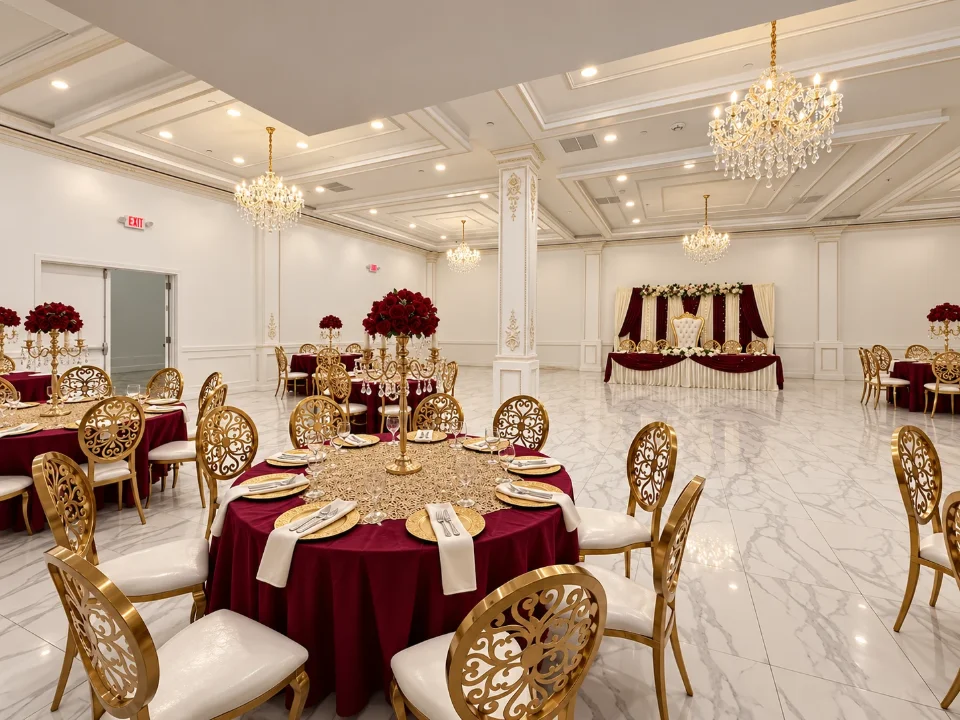
Your rooms are drawn to scale once. Set 25 rounds of 72 inches, the head table, the dance floor and the DJ, and the family walks it in 3D from the entrance or from their own seat, in candlelight, golden hour or daylight.
The plan checks itself: chairs that can’t pull out, tables past the wall, roughly 15 square feet a seated guest, and how many exits the guest count calls for.
A proposal they approve piece by piece.
Your package at a per-guest price, with the 3D room on the cover. The client approves the floor plan, the tables, the backdrop, the invitations, the menu, the cake, the bar and the music one at a time, or asks for a change on the one they don’t love yet.
Signed on their phone.
Turn on the clauses you use (cancellation, guest count changes, damage and rentals, force majeure, photo release, alcohol service) and add your own terms. They sign by drawing or typing their name, and you both keep the PDF.
The payment schedule starts at 30% on signing, 40% at 90 days and 30% at 14 days out. Change any of it. Invoices and receipts are PDFs, and you record each payment as card, transfer, check, cash, Zelle or Venmo.
The guest list fills itself in.
The family sends invitations by text, WhatsApp or email. Guests RSVP from their own link and pick their entrée, one link per household. You seat them by drag and drop, or auto-seat them by group and fix the few that matter.
Lock the count, print the BEO.
Lock the final count and the kitchen and order sheets use that number from then on. Anything over it becomes a change order the client approves from their link.
Print the BEO: food and bar counts, run of show, staff call times, AV, dietary needs, vendor meals and the floor plan, with section titles in English and Spanish for a bilingual kitchen. More on BEOs.
Every phone in the building has its job.
Setup crew, kitchen and service, bar, and DJ and AV each open their own link, no sign-in. The door scans QR tickets with a phone camera, even with bad signal. Vendors get a sheet with their arrival time, the coordinator’s number and what to bring.
The numbers your floor manager asks for.
Worked out from the guest list and the plan, so nobody counts chairs on a napkin.
| From the event | What Tablescape works out |
|---|---|
| The tables on the plan | Linen sizes for each table, to the floor or to the lap (a 72-inch round takes a 132-inch round cloth to the floor), checked against what you have in stock |
| RSVPs with meal choice | Entrée counts per table, kids’ meals and every allergy, on the kitchen sheet |
| Bar package and hours | Drinks, bartenders (one per 50 guests for a full bar, one per 75 for beer and wine) and about 2 lb of ice a guest |
| Cocktail hour | Passed appetizers, about 5 pieces a guest in the first hour and 3 an hour after |
| Room size and layout | Square feet a seat, dance floor size for the crowd, and exits for the head count |
Halls that get the most from it
Independent halls with one to six rooms hosting weddings, quinceañeras, sweet sixteens, baptisms, graduations and company parties of 80 to 500.
Halls that sell the look with in-house linens, chairs and decor, where the family wants to see the room before they pay.
Bilingual teams and families. Client pages, invitations and the BEO work in Spanish as well as English.
What it doesn’t do yet
Take card payments. You set the schedule and send invoices; the money moves through your own processor and you record it.
Online booking. Inquiries come in through your form. There is no public calendar where a client books a date on their own.
Food and beverage minimums. Packages are priced per guest with a room fee. If you sell restaurant-style minimum spends, Tripleseat is built for that.
Bring us your floor plan. We’ll build the room.
Send a photo of your fire-marshal plan or your measurements. During your trial we draw your room to scale with you, with your columns, doors, bar and stage where they really are, so your first tour in 3D is your own hall.
Coming from another system? We move your events for free.
Questions hall owners ask.
What is banquet hall management software?
It keeps a hall’s bookings, clients, contracts, payments, floor plans and event-day paperwork in one place instead of a binder, a calendar and a spreadsheet. Tablescape adds the part clients see: their own link with the 3D room, the menu, the guest list, the contract and the payment schedule.
How much does Tablescape cost for a banquet hall?
Most halls choose Signature: $149 a month billed yearly or $179 billed monthly, with unlimited events and 10 team seats. Studio is $109 a month billed yearly for 25 active events and 3 seats. Every plan starts with 30 days of Signature free, no card needed.
Can it handle a hall with several rooms?
Yes. Each room is drawn to scale with its own doors, columns and built-ins, and the events calendar flags two events booked in the same room on the same day.
Do my clients need to download an app or make an account?
No. Clients, guests, vendors and staff each open a link in their phone’s browser. Nobody signs in except your team.
Does it work in Spanish?
Client and guest pages switch between English and Spanish, invitations can go out in Spanish, staff links switch languages, and the BEO prints with English and Spanish section titles. Your team can also use Easy mode, a simpler planner screen in Spanish. Lee esta página en español.
Can Tablescape take deposits by card?
Not yet. Tablescape sets the payment schedule, sends invoices and receipts, and records each payment, but your own processor or bank moves the money.