Every guest, their table and their entrée.
A couple’s seating chart answers who sits with whom. A venue’s has to answer more: how many fish at table 14, which chair has the shellfish allergy, and whether the kids’ meals go out first. Tablescape builds one chart that answers all of it.
Guests, RSVPs and seating come with every plan. 30 days of Signature free, no card.
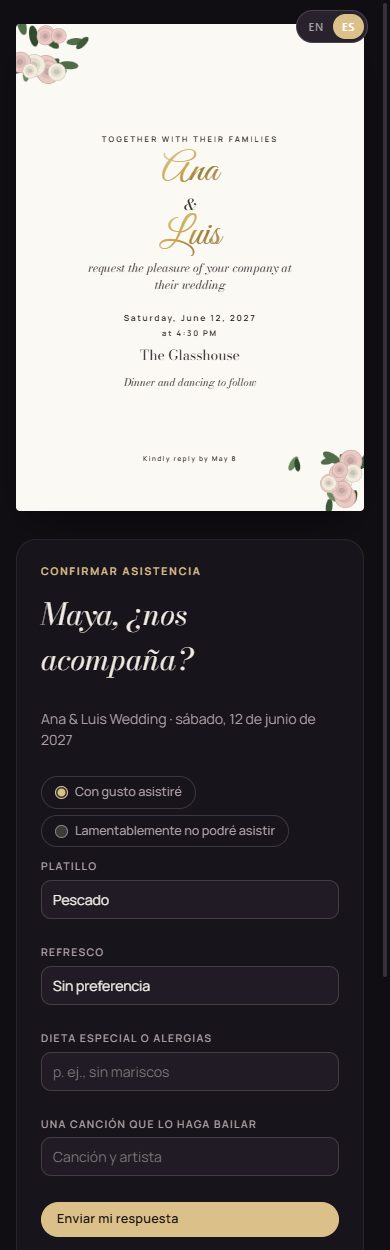
Guests answer with their meal.
Each guest’s link opens the invitation, then asks: coming or not, the entrée, a soft drink, any special diet or allergy, and a song that gets them dancing. In English or Spanish, on their own phone.
Link a household and one link answers for everyone in it, with a separate meal for each person.
Drag to a seat, or auto-seat and adjust.
Drop a guest on a chair rather than only at a table, and their name shows on the floor plan and on the table’s card in 3D. Or let auto-seat fill the tables by group (bride’s family, the court, coworkers) and move the few that need care.
Step 3 · The kitchen sheet.
One PDF the chef can read from across the line. This is what it holds for each table.
| Table | Beef | Chicken | Fish | Veg. | Kids | Allergies and diets |
|---|---|---|---|---|---|---|
| Head table | 4 | 3 | 1 | 0 | 0 | R. Delgado: gluten-free |
| Table 1 | 5 | 3 | 0 | 1 | 1 | M. Okafor: nut allergy |
| Table 2 | 2 | 4 | 2 | 0 | 2 | J. Petrosyan: shellfish allergy · A. Haddad: halal |
| Table 3 | 6 | 2 | 1 | 1 | 0 | None |
Lock the number the kitchen cooks to.
When the final count is due, lock it. The kitchen and order sheets use that number from then on, and late additions become a change order the client approves on their link, so the extra plates are paid for.
Eight tags and a note.
Vegetarian, vegan, gluten-free, dairy-free, nut allergy, shellfish allergy, halal and kosher, plus a free note for anything else. Your entrée list starts at chicken, beef, fish, vegetarian and kids, and you change it to your menu.
Step 4 · Print it.
From the same chart, so a late change never leaves an old card on a table.
| Piece | Format |
|---|---|
| Escort cards | 3.5 × 2 inches, name and table |
| Place cards | 10 to a letter-size page |
| Table numbers | One per table on the plan |
| Seating chart sign | Every table and its guests, for the entrance |
| Day-of packet | The seating section, with the BEO and the floor plan |
Guests can also find their own table on the event website by typing their name; the guest list itself never leaves the server.
Seat your next event on the real plan.
Import the guest list from a spreadsheet, or let the client add guests on their link. Start the trial and try it on an event you already have booked.
Seating chart for 300 guests, worked out.
Questions about seating charts.
Can guests choose their meal when they RSVP?
Yes. The RSVP asks for an entrée from your list, a soft drink and any diet or allergy. Answers go straight to the guest list, the seating chart and the kitchen sheet.
Can I seat guests at specific seats?
Yes. Drag a guest onto a chair and they are seated at that seat. The floor plan can show each name on its chair, and in 3D the client can tap a seat to see the room from it.
Is there automatic seating?
Yes. Auto-seat fills the tables by group, keeping each group together. Most venues auto-seat first and then move the guests who need a particular spot.
Can I import a guest list from Excel?
Yes. Import a spreadsheet with names, groups, meals, diets and table numbers, or let the client add guests on their own link.
Does it print escort cards and place cards?
Yes. Escort cards print at 3.5 by 2 inches and place cards ten to a letter page, along with table numbers and a seating chart sign.